 BestPriceDeal.in
ThinkPads have a reputation. Ask anyone who has worked in an IT company or a bank in India and they’ll tell you about the black laptop that refused to die, survived three office moves, two tea spills and one very rough auto ride.
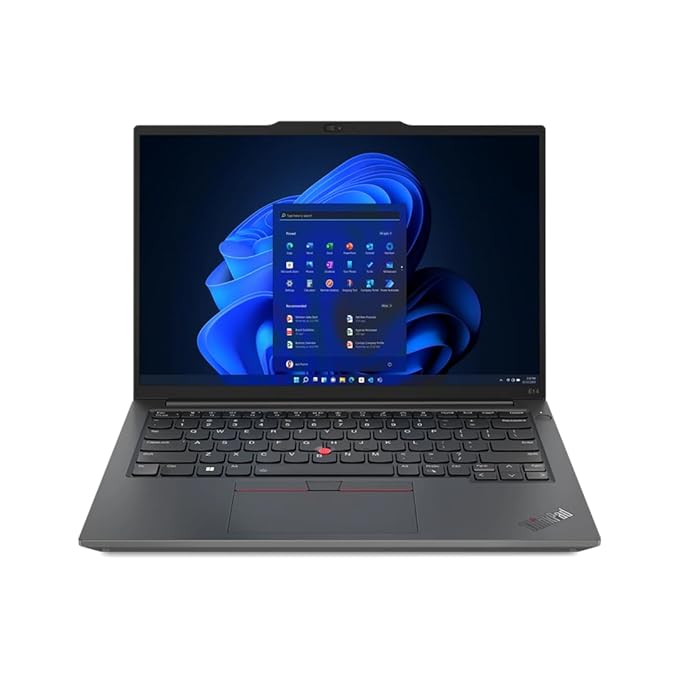
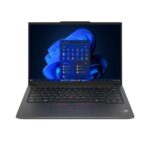
This is the ThinkPad E14 Gen 6, model number 21M3S0AJ00. It’s the more affordable ThinkPad series, made for small businesses, professionals and people who want a work laptop that just keeps going.
It’s a good laptop. I’ll be upfront though: at the price it’s currently listed for, it isn’t the best value for everyone. Let me explain who should buy it and who shouldn’t.
What you get for the money
Here’s the configuration this listing is for:
- Processor: AMD Ryzen 5 7535HS, 6 cores, up to 4.55 GHz
- RAM: 16GB DDR5 (two slots, can go up to 64GB)
- Storage: 512GB M.2 SSD
- Display: 14-inch, 1920 x 1200 IPS, anti-glare, 300 nits, 60Hz
- Graphics: AMD Radeon integrated
- Software: Windows 11 Home and Microsoft Office Home 2024 (lifetime)
- Camera: 1080p webcam with a privacy shutter
- Battery: 47Wh, 65W USB-C charger, about 50% in 30 minutes
- Weight: 1.42 kg
- Warranty: 1 year onsite
When I checked, Amazon had it at ₹90,010 against an MRP of ₹91,800, with exchange offers up to ₹7,300 and ICICI Amazon Pay card cashback. Prices change often, so check the live price before deciding.
The good stuff
The keyboard. This is the main reason people buy ThinkPads, and the E14 doesn’t disappoint. The keys have proper travel, they’re backlit, and the keyboard is spill-resistant. If you type all day (reports, emails, code, Excel) you’ll feel the difference compared with a flat, shallow consumer laptop keyboard. There’s also the little red TrackPoint in the middle, which some people love and some ignore completely.
Ports, finally. Most thin laptops now make you carry a dongle. This one doesn’t. You get two USB-A, two USB-C (both can charge the laptop and run an external monitor), full-size HDMI 2.1, a headphone jack, and even an Ethernet port. For anyone who connects to office projectors, LAN cables or old pen drives, this is a big relief.
You can upgrade it. RAM is in two slots and goes up to 64GB. Very few laptops at any price let you do that now. If your work grows in two years, you can add memory instead of buying a new laptop.
Office 2024 is included. It’s the lifetime version, not a trial. Buying it separately costs a good amount, so do count it when you compare prices.
The work-from-home details. A 1080p webcam (better than the blurry 720p on many laptops), a physical privacy shutter, dual noise-cancelling mics, and a fingerprint reader on the power button. Small things, but you notice them every day.
The 16:10 screen. 1920 x 1200 instead of the usual 1920 x 1080 gives you a little more vertical space. More rows in Excel, more lines in a document. It’s anti-glare too, so overhead office lights don’t bounce off it.
Where it falls short
The screen colours are dull. The panel covers only 45% of the NTSC colour range, and brightness is 300 nits. For documents and browsing it’s perfectly fine. For photo editing, design work or watching movies, colours will look washed out. If you do any creative work, this is the wrong laptop.
The processor is not the newest. The Ryzen 5 7535HS is based on an older AMD design. It handles Office, Chrome, Zoom, Tally, light coding and multitasking without trouble, but it isn’t built for video editing or gaming. There are also no AI features here worth mentioning, despite “Copilot” appearing in the listing. That’s just the Windows key.
Battery life is average. A 47Wh battery with this chip should get you through a normal office day of light work, but keep the charger in your bag. The fast charging helps.
The price. Honestly, this is the big one. At around ₹90,000, you’re paying a lot for a mid-range processor and a basic screen. Regular consumer laptops with similar or better specs often sell for much less. What you’re paying extra for is the ThinkPad build, keyboard, ports and onsite service. For some people that’s worth every rupee. For others, it isn’t.
Customer ratings on Amazon are at 3.8 out of 5 from a small number of reviews, so it’s worth reading a few before you buy.
Who should buy it
This laptop makes sense if you:
- Run a small business, CA practice, or office where the laptop is used 8 to 10 hours a day
- Type a lot and care about a good keyboard
- Need HDMI, Ethernet and USB-A without carrying adapters
- Want onsite warranty, where a technician comes to you
- Plan to keep the laptop for five years or more
It also works well as a laptop bought through a business, since you can get a GST invoice on Amazon and claim input credit, which brings the effective cost down.
Who should look elsewhere
- Students on a budget will get more for their money with a regular IdeaPad or similar.
- Creators, designers and photographers need a better display.
- Gamers need a dedicated graphics card.
- If you mostly browse and watch videos, this is more laptop (and more price) than you need.
My take
The ThinkPad E14 Gen 6 is the kind of laptop you buy for what it does every day, not for its spec sheet. The keyboard, the ports, the upgradeable RAM and onsite service are real advantages, especially for work use.
But don’t buy it at full price without checking. Watch for a sale, use the exchange offer, or buy it with a GST invoice if you’re a business. At a lower price it becomes much easier to recommend.
Questions people usually ask
Is the ThinkPad E14 Gen 6 good for office work?
Yes, that’s exactly what it’s made for. Office, email, video calls, spreadsheets and browsing all run smoothly.
Can I upgrade the RAM later?
Yes. It has two RAM slots and supports up to 64GB DDR5.
Is it good for students?
It will work, but students can usually get similar performance for less money. It suits students only if a great keyboard and long life matter more than price.
Does it come with MS Office?
Yes, Microsoft Office Home 2024 comes preinstalled with a lifetime licence.
Can I connect an external monitor?
Yes, through HDMI 2.1 or either of the USB-C ports.
Is the warranty onsite?
Yes, it comes with one year of onsite warranty from Lenovo.
This post has affiliate links. If you buy through them I may earn a small commission, at no extra cost to you. Prices and offers mentioned were correct when checked and may have changed since.